Pulse
PulseAsk your results anything
AI Insights Chat is an AI analyst built into your Highlight results. Ask a question about your product test in plain English and get the answer, the numbers behind it, and a chart where it helps, all in seconds.
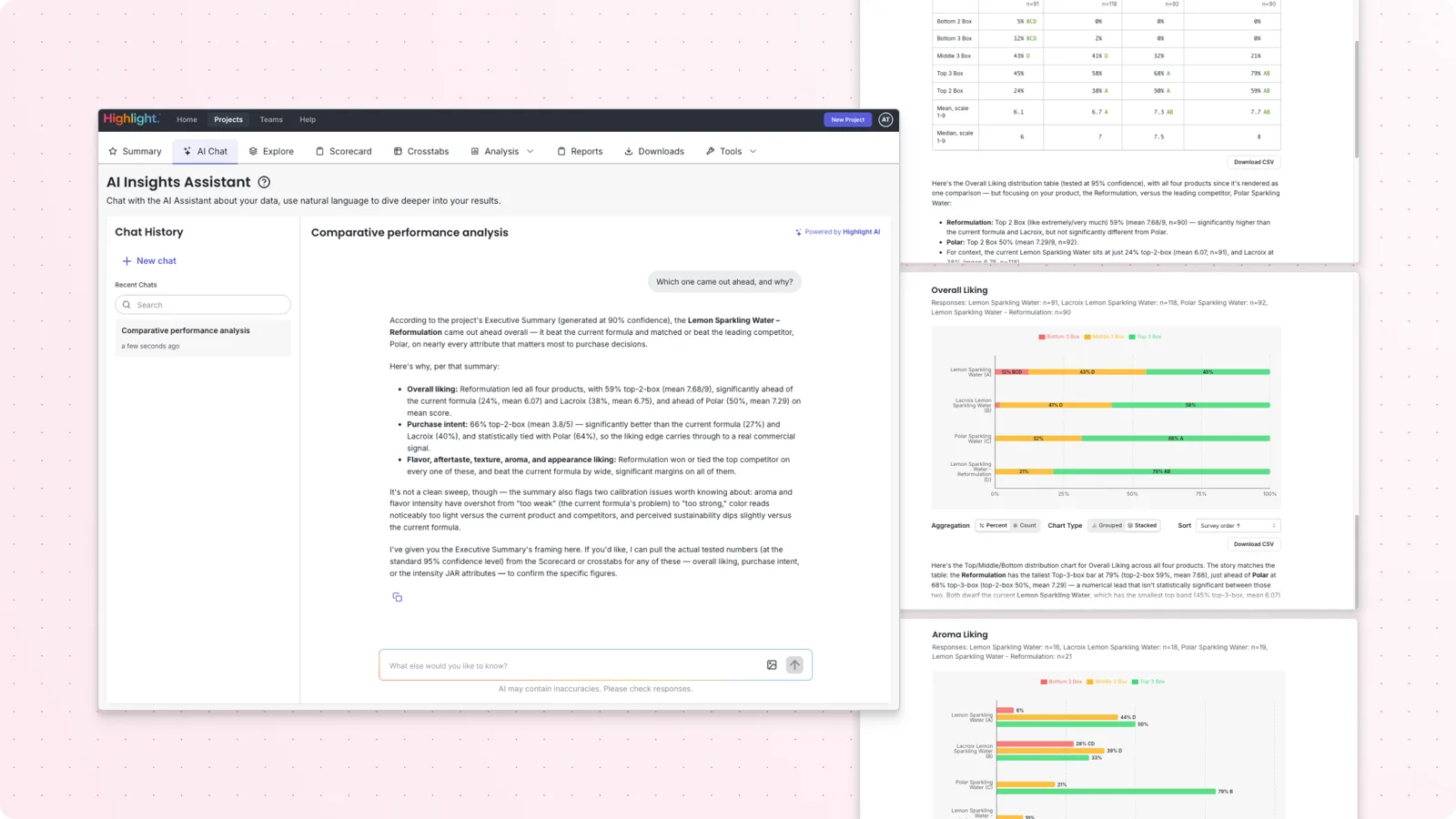
Running the test was never the slow part. Getting answers out of it is.
Every follow-up question a results meeting raises used to mean another round trip to whoever knows the data and has time to dig. Someone asks “does that hold for younger buyers?” and hours or days are lost chasing an answer that should take seconds. AI Insights Chat removes the wait, so you can explore your results from every angle the moment a question comes up.
Ask a question, get an answer, ask the next one. No waiting on someone else to build the report.
Every figure comes from the numbers Highlight already calculated for your results, so you can act on it with confidence.
Ask “what is penalty analysis, and should I use it here?” and get a real answer written by Highlight’s research experts.
Built on your data, not on guesswork
Plenty of AI tools write a confident-sounding summary that’s hard to trace back to a real number. AI Insights Chat is built the other way around.
Every number AI Insights Chat gives you is the same number you’d see in your results tables. Nothing is estimated or invented. If it can’t answer from your data, it tells you so.
Most tools make you pick a survey or a data source before you can ask anything. AI Insights Chat reads every survey in your project, so you just ask the question and it finds where the answer lives.
Compare products, see which differences are big enough to trust, read what people wrote in their own words, and break results down by any group. All of it happens in one conversation, without switching tabs.
Questions about research methods are answered from guides written by Highlight’s in-house research experts, with a link to read more. It is a real perspective, not a generic AI guess.
The questions your presentation couldn’t answer
Start from a suggested question or type your own. Follow-ups remember what you’ve already asked, so “and how does that split by age?” works on its own.
- “Which one came out ahead, and why?”
The winner, the measures that decided it, and the numbers behind each, with a chart if it helps.
- “Which differences are big enough to trust?”
A comparison table that flags which gaps are real and which are too small to act on.
- “What are people saying in their own words?”
A summary of the written feedback, the main themes, how positive or negative it skews, and the actual quotes behind any theme.
- “How does purchase intent differ by product?”
Results side by side for each product, with the differences you can trust marked.
- “Does that hold for women over 35?”
The same read for any group of people. If you haven’t set that group up yet, it offers to create it and asks before it does.
- “What is penalty analysis, and should I use it here?”
A real answer from Highlight’s research guides, with a link to read more.
From question to answer in three steps
- 01Open your project’s results
AI Insights Chat lives in the AI Chat tab, right next to your project summary. It already knows how your study is set up, so there’s nothing to configure.
- 02Ask in plain English
Type your question or pick a suggested one. You get the answer first, then the numbers behind it, then an offer to go deeper.
- 03Keep going
Ask follow-ups in the same thread, attach concept boards or packaging shots, download any chart, and pick a conversation back up later from your chat history.
Your results are encrypted in transit and at rest and handled under Highlight’s data protection practices. Highlight may also aggregate and de-identify data collected through its services and use it for analytics, benchmarking, and data products, as described in our privacy policy and Brand Terms.
Answers use the numbers Highlight already calculated for your results, so you can always check them yourself.
Every conversation belongs to the project you started it on and is private to you. Other people on the project can’t see your chats.
AI Insights Chat questions
What is AI Insights Chat?
AI Insights Chat is an AI analyst built into your Highlight results. You ask questions about your product test in plain English and get the answer, the numbers behind it, and a chart or table where one helps. It uses the same numbers you see in your results tables.
Are the answers accurate, or made up?
Nothing is made up. Every percentage, count, and average comes from the numbers Highlight already calculated for your results. When AI Insights Chat can’t answer from your data, it says so instead of guessing.
Do I need to tell it which survey a question is on?
No. One conversation covers every survey in your project, so you just ask the question and it finds where the answer lives.
Can it handle written feedback?
Yes. Ask for a summary of what people wrote, the main themes, and how positive or negative it skews, then pull the actual quotes behind any theme. You can narrow the quotes by product, group, or a search term, and it tells you how many people said something similar.
Does it tell me which differences are real?
Yes. Ask for a comparison and it returns a table that flags which differences are big enough to trust and which are too small to act on. That is something you would otherwise need an analyst to work out.
How is my data handled?
Highlight AI runs on widely used foundation models, and your data is encrypted in transit and at rest. Highlight may also aggregate and de-identify data collected through its services and use it for analytics, benchmarking, and data products, as described in our privacy policy and Brand Terms.
Where do I find AI Insights Chat?
Open any project in Highlight, go to your results, and click the AI Chat tab, right next to your project summary. It works on one project at a time.
Stop waiting on answers.
See AI Insights Chat on your own study, or log in and ask your results a question today.
Already a customer? Open any project, go to your results, and click AI Chat. Read the help article